Board Sense v0.1: the invisible pressure board, made visible
Chess has two boards. There’s the physical one where the pieces sit, and then there’s the invisible one: the web of what every piece attacks, defends, controls, blocks, and threatens. Strong players see that second board instinctively. Beginners (and honestly, a lot of intermediates — hi) mostly don’t, which is why we hang pieces and miss why a “quiet” move was actually a big deal. Board Sense is my attempt to make that second board visible — and it’s live right now if you want to try it.
Version 0.1 already does more than I expected when I started. You can load any PGN — or pick from built-in openings and famous games like Morphy’s Opera Game — and step through move by move. Empty squares tint blue or red depending on who controls them (purple when contested), with little pips counting exactly how many pieces control each square. Hover any piece and you get the full picture: what it attacks, what it defends, what’s attacking it, what’s defending it, all drawn as arrows with a text breakdown. Hanging pieces glow. And after every move, a delta pulse shows exactly what changed — “now hanging: ♟e4” is a surprisingly effective way to learn what a move really did.
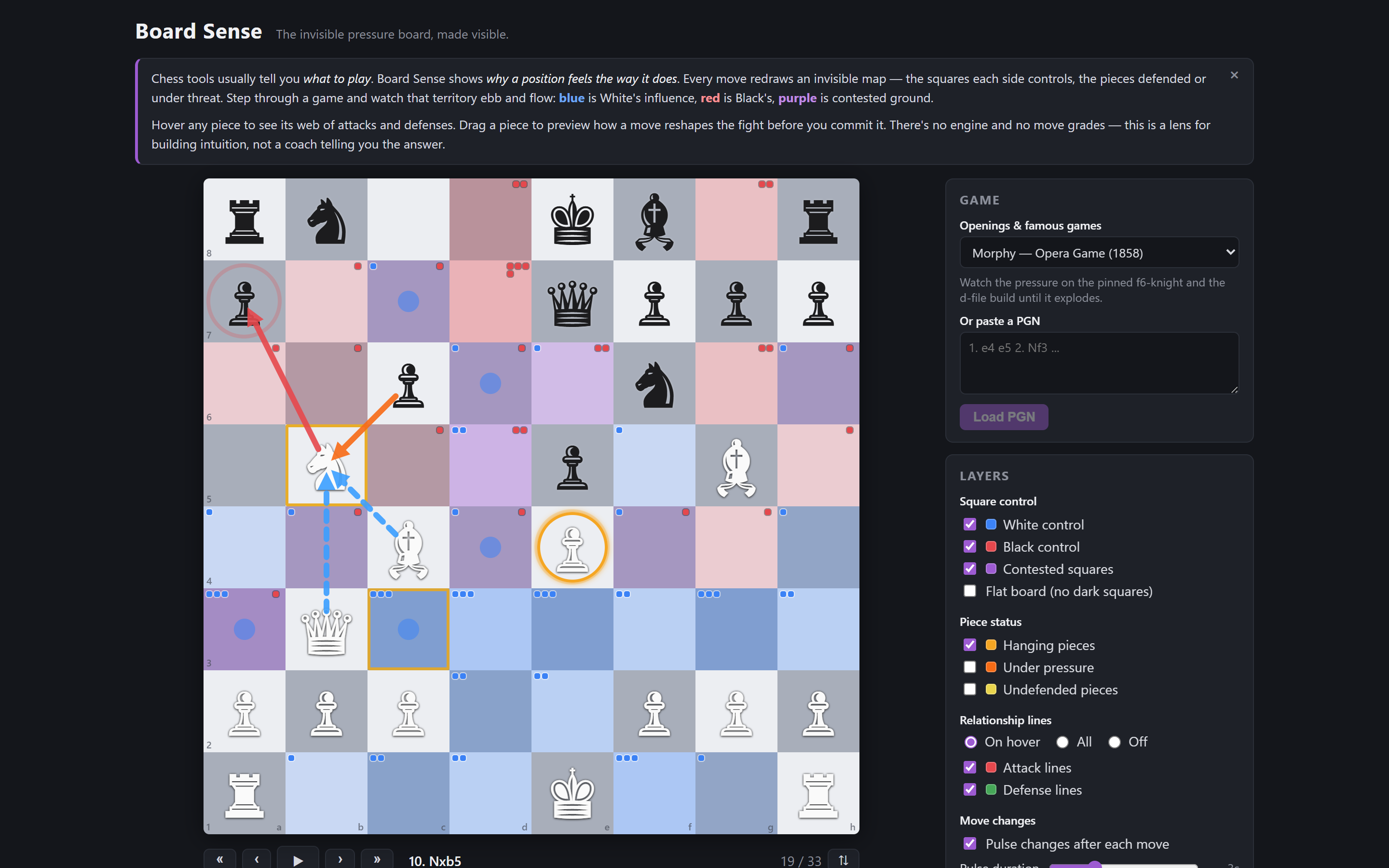
My favorite part is sandbox mode. At any point in a game you can just grab a piece and try a move — and while you’re dragging, the entire pressure map previews live for whatever square you’re hovering. It turns “I wonder what happens if…” from a calculation exercise into something you can literally see.
The biggest thing I learned: the hard part wasn’t the chess logic (chess.js carries a lot of weight there) — it was visual restraint. Early versions drew every relationship at once and looked like a plate of spaghetti. Almost all the design work went into deciding what not to show at any given moment. Next up: pins, skewers, and discovered attacks — the relationships you can’t see from raw attack lines alone.